
Thing You Should Know
Every Airflow concept you'll ever use — pipelines, retries, dependencies, monitoring — comes back to one shape: the DAG, and a handful of terms attached to it. Get this vocabulary solid now and every later page reads twice as fast.
Apache Airflow is an open-source platform for programmatically authoring, scheduling, and monitoring batch-oriented workflows.
Airflow's extensible Python framework enables you to build workflows connecting with virtually any technology. A web interface helps manage the state of your workflows. Airflow is deployable in many ways, varying from a single process on your laptop to a distributed setup to support even the largest workflows.
Workflows as Code
The main characteristic of Airflow workflows is that all workflows are defined in Python code. "Workflows as code" serves several purposes:
| Benefit | Description |
|---|---|
| Dynamic | Airflow pipelines are configured as Python code, allowing for dynamic pipeline generation |
| Extensible | The Airflow framework contains operators to connect with numerous technologies. All Airflow components are extensible to easily adjust to your environment |
| Flexible | Workflow parameterization is built-in leveraging the Jinja templating engine |
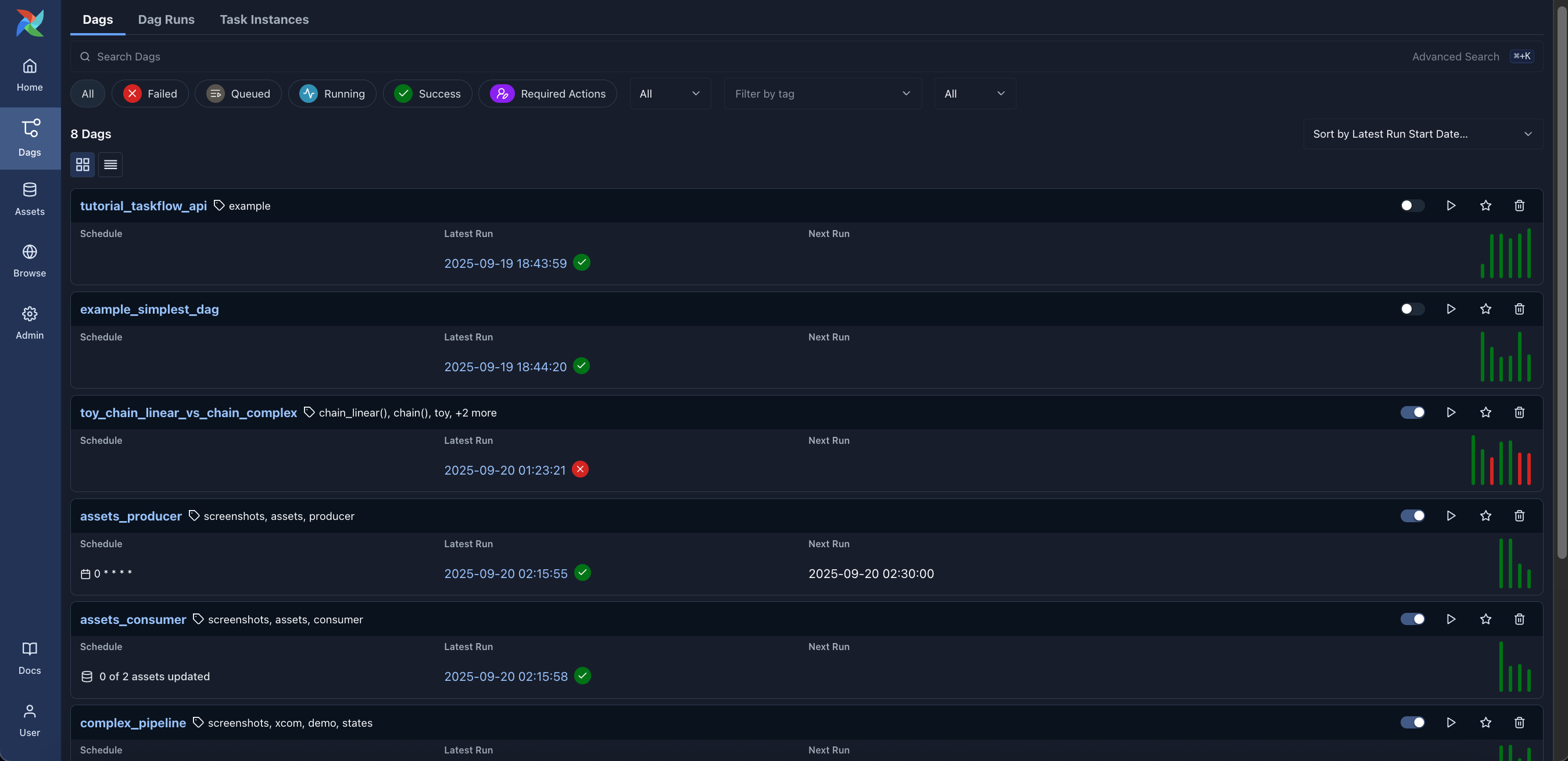
Monitoring DAGs in the Airflow Web UI
The Airflow Web UI serves as a central cockpit for managing and monitoring workflows. It lists all registered DAGs, showing their schedules, owners, execution history, active statuses, and execution timings:
Understanding Task State Colors on the Screen
When you monitor or test a DAG in the Airflow UI (such as in Grid View, Graph View, or Tree View), Airflow represents each task instance as a small block or node. As the Airflow Scheduler and Worker execute the tasks, the screen updates dynamically, changing the box color to visually indicate the real-time execution state:
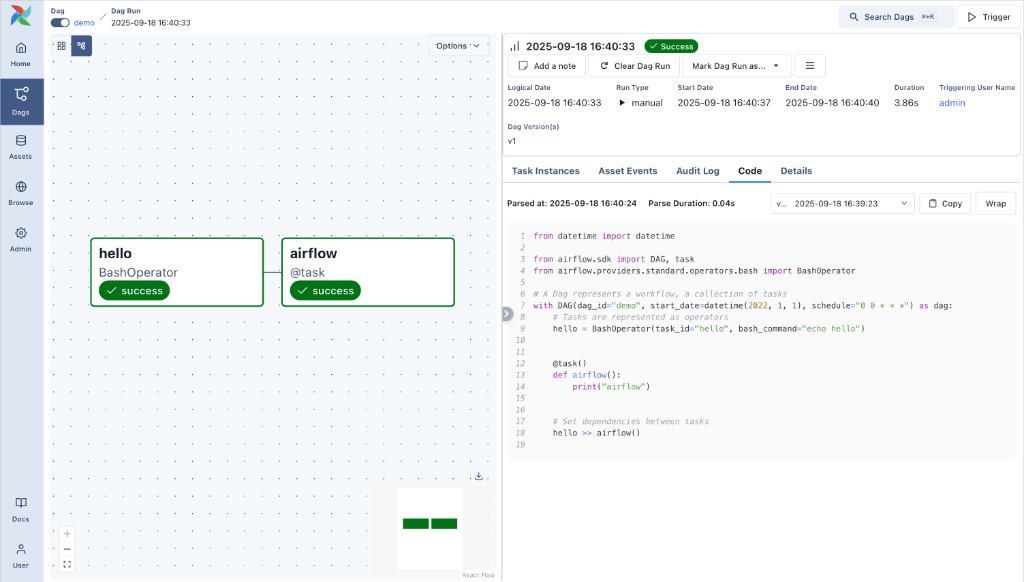
| UI Color & Appearance | Airflow State | What happens on the screen & What it means | What action to take |
|---|---|---|---|
| Dark Green / Green | success |
The task instance ran and completed cleanly with a return code of 0. The pipeline immediately proceeds to downstream dependent tasks. |
None. The task succeeded! You can click the block to inspect output logs or XComs pushed by this task. |
| Red | failed |
The task threw an exception, timed out, or exited with an error code, and has exhausted all configured retries. Downstream tasks will not run unless configured with trigger rules like all_done or all_failed. |
Investigate & Re-run. Click the red box → go to Logs to find the traceback. Fix the root cause (e.g., database connection down, bad schema), then click Clear / Retry on the task block to re-run it from the exact point of failure. |
| Light Green / Lime | running |
The task has been picked up by a worker slot (e.g., Celery or Kubernetes executor) and is actively executing your Python code or query right now. | Monitor. Click the block and open Logs to watch real-time streaming output as the job progresses. |
| Orange / Gold | up_for_retry |
The task failed its initial attempt but has remaining retries configured in default_args (e.g., retries: 3). Airflow has released the worker slot and set a timer based on retry_delay. |
Wait or Check. The scheduler will automatically transition this box back to queued and running once the retry delay elapses. |
| Gray / Light Blue | queued |
The task's upstream dependencies have been met, and the scheduler has submitted the task to the executor queue. It is waiting for an available worker slot. | Wait. If boxes stay in this state too long, check if your worker pool concurrency limits are exhausted. |
| Pink | skipped |
The task was bypassed during this DAG run. This happens when a BranchPythonOperator took a different path, a ShortCircuitOperator returned False, or trigger rules evaluated to skip. |
Normal behavior. Downstream tasks dependent solely on skipped tasks will also automatically turn pink (skipped). |
| Yellow | up_for_reschedule |
Specifically used by Sensors in reschedule mode. The sensor checked for a condition (e.g., a file landing in S3), found it not ready, and released its worker slot to save resources until the next check interval. | Normal waiting. The sensor will re-awaken and turn green (running) at the next check interval. |
| White / Clear | none |
The task instance has been instantiated by the scheduler but its upstream dependencies have not yet completed. | Wait. Once preceding green boxes finish, this box will transition to queued → running. |
In Grid or Graph view, clicking any colored box opens the right-hand Task Instance Details panel. From here, you can directly access:
- Logs: View exact runtime stdout/stderr output.
- Rendered: Inspect how Jinja templates (e.g., execution dates, SQL queries) were evaluated for that specific run.
- XCom: View key-value metadata pushed by this task.
- Clear (Re-run): Reset the state of a red (failed) block back to white/queued to re-run it after applying a fix.
Airflow is not a data streaming solution. Workflows are expected to be mostly static or slowly changing. If you need real-time data processing, consider Apache Kafka, Apache Flink, or Apache Spark Streaming. Airflow is an orchestrator, not a processing framework.
The DAG — Airflow's Fundamental Abstraction
In Airflow, a DAG (Directed Acyclic Graph) is a collection of all the tasks you want to run, organized in a way that reflects their relationships and dependencies. A DAG is defined in a Python script, which represents the DAGs structure (tasks and their dependencies) as code.
graph LR
    subgraph "DAG: etl_sales_pipeline"
        A["extract_from_api"] --> B["validate_schema"]
        A --> C["extract_from_db"]
        B --> D["transform_data"]
        C --> D
        D --> E["load_to_warehouse"]
        E --> F["run_data_quality"]
        F --> G["notify_stakeholders"]
    end
    style A fill:#4CAF50,stroke:#388E3C,color:#fff
    style B fill:#FF9800,stroke:#F57C00,color:#fff
    style C fill:#4CAF50,stroke:#388E3C,color:#fff
    style D fill:#2196F3,stroke:#1976D2,color:#fff
    style E fill:#9C27B0,stroke:#7B1FA2,color:#fff
    style F fill:#F44336,stroke:#D32F2F,color:#fff
    style G fill:#607D8B,stroke:#455A64,color:#fff
Key Properties of a DAG
- Directed — Each dependency has a clear direction. Task A runs before Task B.
- Acyclic — There are no circular dependencies. You cannot have A → B → C → A.
- Graph — Tasks are nodes, dependencies are edges. This structure enables parallel execution.
Defining a DAG in Python
from airflow.sdk import DAG, dag
from airflow.providers.standard.operators.python import PythonOperator
from datetime import datetime, timedelta

# Method 1: Context Manager (Most Common)
with DAG(
    dag_id="etl_sales_pipeline",
    description="Daily ETL pipeline for sales data",
    schedule="0 6 * * *",          # Run daily at 6:00 AM UTC
    start_date=datetime(2024, 1, 1),
    catchup=False,                  # Don't backfill historical runs
    tags=["production", "sales"],
    default_args={
        "owner": "data-engineering",
        "retries": 3,
        "retry_delay": timedelta(minutes=5),
        "email_on_failure": True,
        "email": ["data-team@company.com"],
    },
) as dag:

    extract = PythonOperator(
        task_id="extract_from_api",
        python_callable=extract_sales_data,
    )

    transform = PythonOperator(
        task_id="transform_data",
        python_callable=transform_sales_data,
    )

    load = PythonOperator(
        task_id="load_to_warehouse",
        python_callable=load_to_snowflake,
    )

    # Define execution order
    extract >> transform >> load
# Method 2: TaskFlow API with @dag Decorator (Airflow 2.0+)
from airflow.sdk import dag, task
from datetime import datetime

@dag(
    schedule="@daily",
    start_date=datetime(2024, 1, 1),
    catchup=False,
    tags=["production"],
)
def etl_sales_pipeline():

    @task()
    def extract():
        \"\"\"Extract data from source systems.\"\"\"
        return {"data": [1, 2, 3]}

    @task()
    def transform(raw_data: dict):
        \"\"\"Clean and transform raw data.\"\"\"
        return {"transformed": raw_data["data"]}

    @task()
    def load(transformed_data: dict):
        \"\"\"Load data into warehouse.\"\"\"
        print(f"Loading {len(transformed_data['transformed'])} records")

    # Dependencies are inferred from function calls
    raw = extract()
    transformed = transform(raw)
    load(transformed)

etl_sales_pipeline()
The TaskFlow API (Method 2) is the recommended way to write DAGs in Airflow 2.x and above. It provides cleaner syntax, automatic XCom handling, and better type safety. Use the traditional Operator style only when you need specific operator features.
Core Terminology
| Term | Definition | Example |
|---|---|---|
| DAG | A Directed Acyclic Graph — the blueprint of your workflow | etl_sales_pipeline |
| Task | A single unit of work within a DAG | extract_from_api |
| Task Instance | A specific run of a task for a given execution date | extract_from_api on 2024-01-15 |
| DAG Run | A single execution of an entire DAG | etl_sales_pipeline at 2024-01-15T06:00 |
| Operator | A template for a predefined task | PythonOperator, BashOperator |
| Sensor | A special operator that waits for a condition | S3KeySensor, HttpSensor |
| Hook | An interface to external platforms (databases, APIs) | PostgresHook, S3Hook |
| Connection | Stored credentials for external systems | postgres_default, aws_default |
| Variable | A key-value store for DAG configuration | env=production, s3_bucket=my-data |
| XCom | Cross-communication between tasks | Task A passes output to Task B |
| Provider | An installable package adding support for a technology | apache-airflow-providers-amazon |
Never confuse Airflow with a data processing engine. Airflow orchestrates — it tells Spark when to run, tells dbt when to build, and tells S3 when to transfer files. The actual heavy computation happens in external systems.
What Airflow is NOT
Understanding what Airflow is not is equally important for making the right architectural decisions:
| Airflow IS | Airflow is NOT |
|---|---|
| Workflow orchestrator | Streaming platform (use Kafka/Flink) |
| Batch scheduler | Data processing engine (use Spark/dbt) |
| Task dependency manager | Data storage system (use S3/HDFS) |
| Monitoring & alerting tool | ML training platform (use MLflow/Kubeflow) |
| Workflow versioning system | CI/CD pipeline (use Jenkins/GitHub Actions) |