
SNS & SQS Operators & Hooks
Airflow Talking to the Rest of Your Architecture
Not every downstream consumer of a pipeline's output is another Airflow task. SNS (pub/sub fan-out) and SQS (a durable work queue) are how an Airflow DAG hands off "I'm done, here's what happened" to everything else in an AWS-based architecture — a Lambda, a microservice, a completely separate team's system.
SNS vs SQS — Which One?
| SNS (Simple Notification Service) | SQS (Simple Queue Service) | |
|---|---|---|
| Model | Pub/sub — one message, many subscribers | Queue — one message, one consumer picks it up |
| Use it when | Multiple independent systems all need to react to the same event | You need a durable, ordered (or best-effort) work queue that a consumer polls at its own pace |
| Typical Airflow use | "Pipeline succeeded/failed" fan-out notification | Handing off a discrete unit of work to a downstream service |
They're often used together: publish once to an SNS topic, and have an SQS queue subscribed to it — which is exactly the pattern this page's DAG demonstrates.
SNS: Publishing a Notification
from airflow.providers.amazon.aws.operators.sns import SnsPublishOperator

notify_pipeline_complete = SnsPublishOperator(
    task_id="notify_pipeline_complete",
    aws_conn_id="aws_default",
    target_arn="arn:aws:sns:us-east-1:123456789012:pipeline-alerts",
    message="Nightly sales pipeline completed successfully.",
    subject="Pipeline Success",
)
target_arn accepts either a topic ARN (fans out to every subscriber — email, SQS queues, Lambda functions, HTTPS endpoints) or a specific phone number ARN for direct SMS.
SQS: Publishing and Consuming Work
from airflow.providers.amazon.aws.operators.sqs import SqsPublishOperator
from airflow.providers.amazon.aws.sensors.sqs import SqsSensor

enqueue_downstream_job = SqsPublishOperator(
    task_id="enqueue_downstream_job",
    aws_conn_id="aws_default",
    sqs_queue="https://sqs.us-east-1.amazonaws.com/123456789012/downstream-jobs",
    message_content='{"job": "refresh_dashboard", "date": "2026-09-04"}',
)

# The other direction: Airflow WAITING for a message to arrive -
# useful when something external enqueues work for Airflow to react to.
wait_for_downstream_ack = SqsSensor(
    task_id="wait_for_downstream_ack",
    aws_conn_id="aws_default",
    sqs_queue="https://sqs.us-east-1.amazonaws.com/123456789012/downstream-jobs",
    max_messages=1,
    wait_time_seconds=20,   # SQS long-polling - cheaper and faster than short-polling
)
Both directions, run for real — SnsPublishOperator and SqsPublishOperator firing in parallel, then SqsSensor picking the message back up:
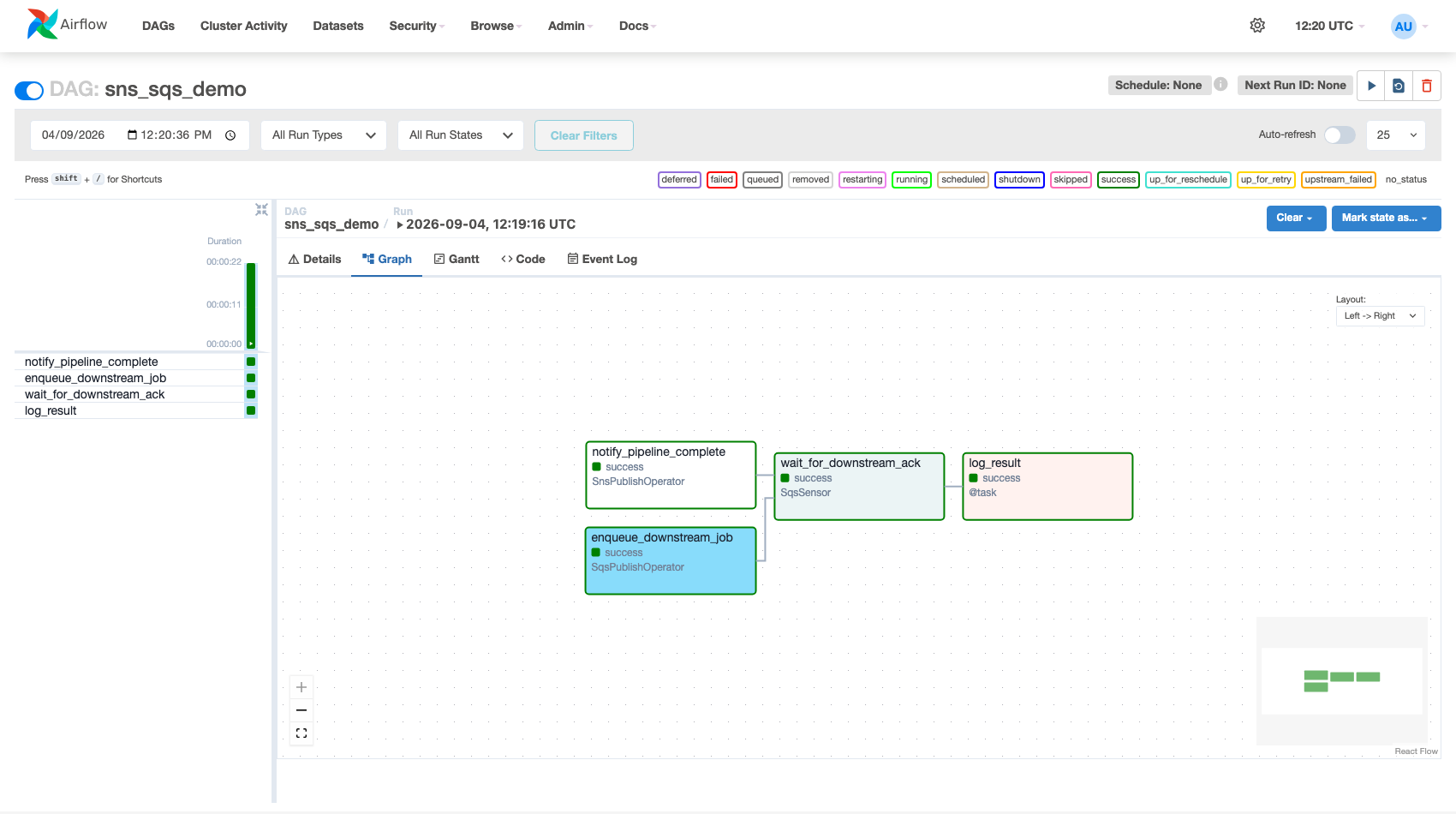 Figure — a genuine SNS publish and SQS publish, both against real AWS resources, with the sensor confirming message delivery.
By default,
SqsSensor deletes the message from the queue once it reads it (same as any SQS consumer would). If a different system also needs to see that message, either don't have Airflow consume it, or explicitly set delete_message_on_reception=False and let each real consumer manage deletion itself.
The Hooks Directly
from airflow.providers.amazon.aws.hooks.sns import SnsHook
from airflow.providers.amazon.aws.hooks.sqs import SqsHook

def publish_conditionally(**context):
    sns = SnsHook(aws_conn_id="aws_default")
    if context["task_instance"].xcom_pull(task_ids="validate")["passed"]:
        sns.publish_to_target(
            target_arn="arn:aws:sns:us-east-1:123456789012:pipeline-alerts",
            message="Validation passed, proceeding to load.",
        )

def peek_queue_depth(**context):
    sqs = SqsHook(aws_conn_id="aws_default")
    client = sqs.get_conn()
    attrs = client.get_queue_attributes(
        QueueUrl="https://sqs.us-east-1.amazonaws.com/123456789012/downstream-jobs",
        AttributeNames=["ApproximateNumberOfMessages"],
    )
    return int(attrs["Attributes"]["ApproximateNumberOfMessages"])
Reach for the Hook directly (over the operator) whenever the decision to publish is conditional, or when you need queue metadata — like checking backlog depth before deciding whether to enqueue more work — that the operators don't expose.
SNS and SQS hooks weren't in this course's original Hooks reference table alongside Postgres/S3/BigQuery — despite being two of the most common ways an Airflow pipeline talks to the rest of an AWS-based architecture. This page is that missing coverage.