
SSH, Docker & Generic SQL Operators
The Three Operators That Don't Belong to Any One Cloud
Everything covered so far in this module is tied to a specific provider - AWS, a specific database, a specific cloud. These three aren't: SSHOperator reaches any server, DockerOperator runs any image on any Docker daemon, and SQLExecuteQueryOperator speaks to any database with a JDBC-style connection. They're the generic fallback when nothing more specific fits.
SSHOperator and DockerOperator need a real remote host / Docker daemon to target, neither available in this sandbox - that code is correct but shown without a live run, same honest treatment as EMR/Redshift/Glue/ECS-Batch/KubernetesPodOperator. SQLExecuteQueryOperator, below, was run for real against a genuine (if minimal) database.
SSHOperator — Run a Command on a Remote Host
from airflow.providers.ssh.operators.ssh import SSHOperator

check_disk_space = SSHOperator(
    task_id="check_disk_space",
    ssh_conn_id="prod_server_ssh",
    command="df -h /data",
)
ssh_conn_id points at an Airflow Connection of type SSH, storing the host, username, and either a password or a private key. Everything about authentication lives in the Connection, never in the DAG code.
If a purpose-built operator already exists for what you're doing (an AWS/GCP service, a database with its own hook), use that instead - it handles retries, connection pooling, and error parsing specific to that system. Reach for SSHOperator when the target is a plain server with no such operator: a legacy on-prem box, a self-managed VM running something with no Airflow provider.
DockerOperator — Run a Container on a Docker Daemon
from airflow.providers.docker.operators.docker import DockerOperator

run_transform_container = DockerOperator(
    task_id="run_transform_container",
    image="my-registry/transform-tool:v2.1",
    command="python transform.py --date {{ ds }}",
    docker_url="unix://var/run/docker.sock",   # the Docker daemon to target
    network_mode="bridge",
    auto_remove="success",
)
This is the non-Kubernetes sibling of KubernetesPodOperator (covered on the previous page) — same idea, "run this container image as a task," but targeting a plain Docker daemon (often the same host the Airflow worker runs on) instead of a Kubernetes cluster.
| DockerOperator | KubernetesPodOperator | |
|---|---|---|
| Target | A single Docker daemon | A Kubernetes cluster (any number of nodes) |
| Scaling | Limited to that daemon's host resources | Scales across the whole cluster |
| Typical fit | Small teams, simple infra, no Kubernetes | Teams already running Kubernetes |
SQLExecuteQueryOperator — Any Database, One Operator
The generic SQL operator, for any database with a standard DB-API/JDBC-style connection (Postgres, MySQL, SQLite, and more) — the same interface regardless of which one:
from airflow.providers.common.sql.operators.sql import SQLExecuteQueryOperator

validate_row_count = SQLExecuteQueryOperator(
    task_id="validate_row_count",
    conn_id="orders_db",
    sql="SELECT COUNT(*) FROM orders WHERE amount > 0",
)
Run for real, against a genuine (if minimal) SQLite database created specifically for this task:
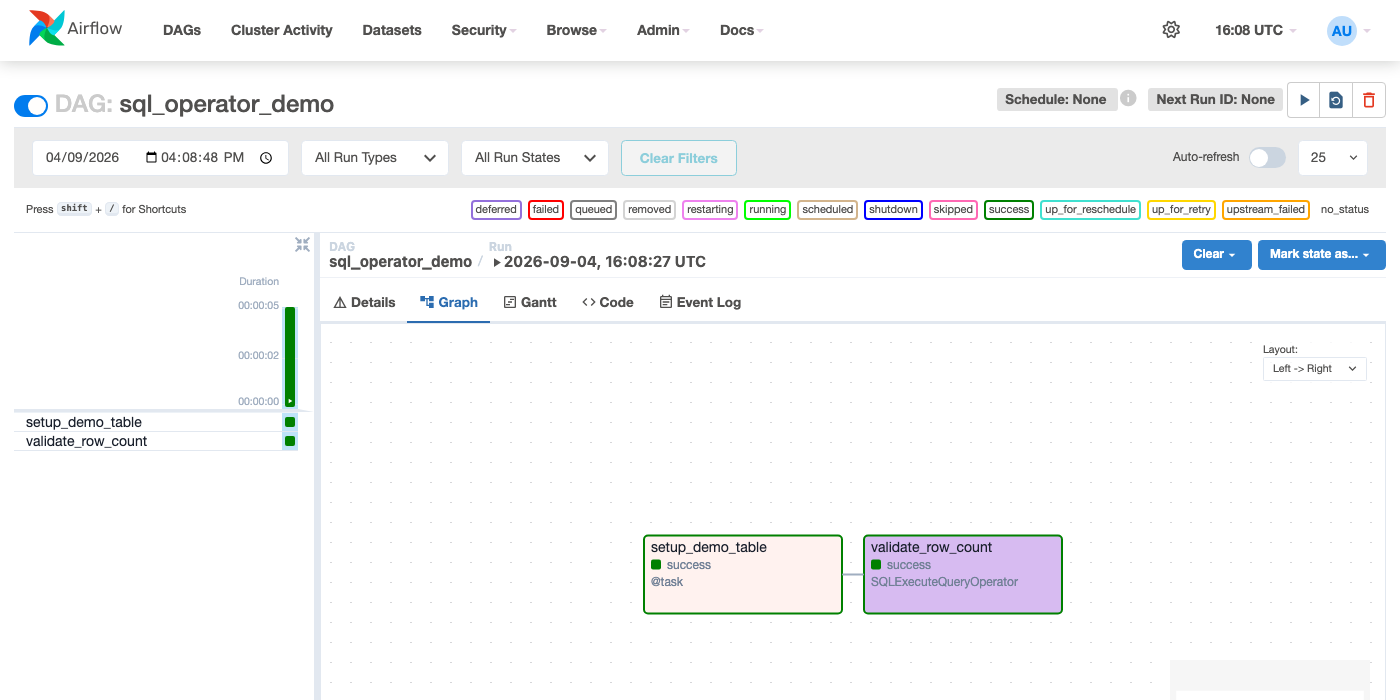 Figure — the first task creates and populates a real table;
 SQLExecuteQueryOperator then queries it for real over the sqlite_demo connection.
SQLExecuteQueryOperator works everywhere but knows nothing special about any one database. RedshiftDataOperator, BigQueryInsertJobOperator, and similar provider-specific operators (covered on their own pages) add things the generic one can't: async polling via that service's own API, service-specific error handling, and integration with that provider's other operators. Prefer the specific operator when one exists for your database; fall back to the generic one when it doesn't.