
Writing Your Own Operators, Hooks & Sensors
When the Provider Ecosystem Doesn't Have What You Need
Hundreds of operators exist for hundreds of systems — but eventually you'll hit an internal API, a proprietary tool, or a validation rule specific to your company that no provider package covers. This page is what to do next: build the operator yourself. It's a normal, expected part of working with Airflow, not an escape hatch.
The Three Base Classes
Every operator, sensor, and hook in Airflow — built-in or your own — is ultimately a subclass of one of these three:
| Base Class | Purpose | You Implement |
|---|---|---|
BaseOperator |
Any task that does something | execute(self, context) |
BaseSensorOperator |
A task that waits for a condition | poke(self, context) — return True when the condition is met |
BaseHook |
A reusable connection to an external system | Usually a get_conn() method wrapping the target system's client library |
If you catch yourself copy-pasting the same 20 lines of
PythonOperator boilerplate into three different DAGs, that's the signal to extract it into a real custom operator instead.
Building a Custom Operator
A custom operator is a normal Python class. The only contract Airflow requires: subclass BaseOperator, call super().__init__(**kwargs), and implement execute().
from airflow.models import BaseOperator
from airflow.utils.context import Context


class RowCountValidatorOperator(BaseOperator):
    """Fails the task if a table has fewer rows than expected."""

    # template_fields tells Airflow which __init__ args accept Jinja
    # templating (e.g. {{ ds }}) - without this, templates in these
    # fields are passed through as literal strings, not rendered.
    template_fields = ("table_name",)

    def __init__(self, table_name: str, min_rows: int = 1, **kwargs):
        super().__init__(**kwargs)
        self.table_name = table_name
        self.min_rows = min_rows

    def execute(self, context: Context):
        # In production this would use a Hook (see below) to run a
        # real COUNT(*) query. Kept inline here for the example.
        row_count = self._query_row_count(self.table_name)
        self.log.info(f"{self.table_name}: {row_count} rows")

        if row_count < self.min_rows:
            raise ValueError(
                f"{self.table_name} has {row_count} rows, expected at least {self.min_rows}"
            )
        return {"table": self.table_name, "row_count": row_count}

    def _query_row_count(self, table_name: str) -> int:
        ...  # real implementation: PostgresHook(...).get_first(f"SELECT COUNT(*) FROM {table_name}")
Using it in a DAG looks exactly like using any built-in operator:
validate_orders = RowCountValidatorOperator(
    task_id="validate_orders_table",
    table_name="orders",
    min_rows=100,
)
Here's that exact DAG, run for real — notice the Graph View shows RowCountValidatorOperator as the task's type, right alongside the built-in ones you've already seen:
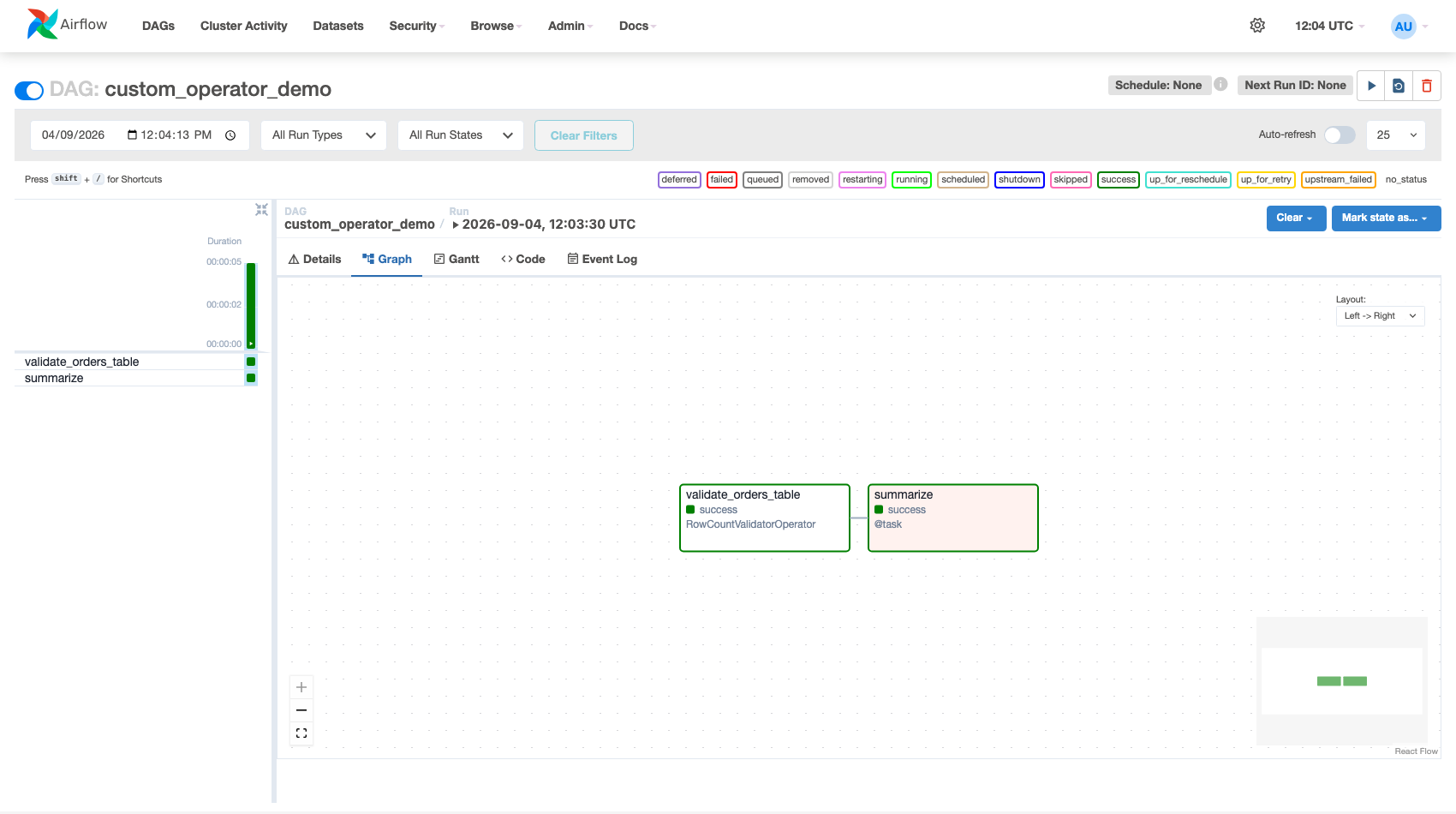 Figure — the custom operator's class name appears directly in the UI, exactly like a built-in operator would.
self.log is available automatically on every operator — it's Airflow's task logger, and anything you log there shows up in the Task Instance's Logs tab in the UI, same as a built-in operator.
Building a Custom Sensor
Sensors implement poke() instead of execute(). Return False to keep waiting, True once the condition is satisfied — Airflow handles the re-checking loop for you.
from airflow.sensors.base import BaseSensorOperator
from airflow.utils.context import Context


class InternalApiJobDoneSensor(BaseSensorOperator):
    """Polls an internal job-status API until it reports 'complete'."""

    template_fields = ("job_id",)

    def __init__(self, job_id: str, **kwargs):
        super().__init__(**kwargs)  # accepts poke_interval, timeout, mode, etc. from BaseSensorOperator
        self.job_id = job_id

    def poke(self, context: Context) -> bool:
        status = self._check_job_status(self.job_id)
        self.log.info(f"Job {self.job_id} status: {status}")
        return status == "complete"

    def _check_job_status(self, job_id: str) -> str:
        ...  # real implementation: requests.get(f"https://internal-api/jobs/{job_id}").json()["status"]
Everything covered in the Sensors lesson — poke vs reschedule vs deferrable mode — applies identically to a custom sensor. Just pass mode="reschedule" when instantiating it if the wait could be long.
Building a Custom Hook
A Hook wraps how to connect, so operators and sensors don't each reimplement authentication. The convention: read credentials from an Airflow Connection via self.get_connection(), then expose a thin client.
from airflow.hooks.base import BaseHook


class InternalApiHook(BaseHook):
    """Wraps auth + a couple of convenience methods for an internal REST API."""

    def __init__(self, conn_id: str = "internal_api_default"):
        super().__init__()
        self.conn_id = conn_id

    def get_conn(self):
        conn = self.get_connection(self.conn_id)
        return {
            "base_url": conn.host,
            "headers": {"Authorization": f"Bearer {conn.password}"},
        }

    def get_job_status(self, job_id: str) -> str:
        client = self.get_conn()
        ...  # requests.get(f"{client['base_url']}/jobs/{job_id}", headers=client['headers'])
        return "complete"
With the Hook in place, InternalApiJobDoneSensor.poke() becomes one line: return InternalApiHook().get_job_status(self.job_id) == "complete" — and any other operator that also needs this API reuses the same Hook instead of re-implementing auth.
A Hook's job is only "how do I connect and make basic calls." Business logic (what counts as a valid row count, what "done" means for your pipeline) belongs in the Operator or Sensor that uses the Hook — not inside the Hook itself. This keeps the Hook reusable across completely different use cases.
Packaging for Reuse
A single custom operator living in one DAG file is fine to start. Once two or more DAGs need it, move it out:
dags/
├── my_pipeline_dag.py
├── another_pipeline_dag.py
└── plugins/
    └── operators/
        ├── __init__.py
        └── row_count_validator.py     # RowCountValidatorOperator lives here
# In any DAG file:
from plugins.operators.row_count_validator import RowCountValidatorOperator
This is also the on-ramp to Airflow Plugins (custom UI views, macros, and menu links packaged alongside custom operators) — covered separately in the Production Operations module.