
dbt & Cosmos — Orchestrating In-Warehouse Transforms
The Most Common Pairing in Modern Data Stacks
dbt owns the "what" - SQL models describing transformations that run inside the warehouse. Airflow owns the "when" - scheduling, retries, alerting, and fitting those transforms into a bigger pipeline alongside extraction and loading. Cosmos is the bridge: it turns a dbt project into real Airflow tasks, one per model, instead of one opaque "run dbt" black box.
Without Cosmos: The BashOperator Approach
The most basic integration — technically works, but the whole dbt run is one opaque task:
from airflow.providers.standard.operators.bash import BashOperator

run_dbt = BashOperator(
    task_id="run_dbt_models",
    bash_command="cd /opt/dbt/my_project && dbt run",
)
If any model fails, you get one red box and have to dig into logs to find which of possibly dozens of models actually broke. No per-model retries, no per-model dependency visibility in the Graph View.
With Cosmos: One Airflow Task Per dbt Model
from cosmos import DbtDag, ProjectConfig, ProfileConfig, ExecutionConfig

project_config = ProjectConfig("/opt/dbt/my_project")
profile_config = ProfileConfig(
    profile_name="my_project",
    target_name="prod",
    profiles_yml_filepath="/opt/dbt/my_project/profiles.yml",
)
execution_config = ExecutionConfig(dbt_executable_path="/usr/local/bin/dbt")

my_dbt_dag = DbtDag(
    project_config=project_config,
    profile_config=profile_config,
    execution_config=execution_config,
    schedule="@daily",
    start_date=datetime(2024, 1, 1),
    dag_id="my_dbt_project",
)
DbtDag parses the dbt project's manifest.json (its model dependency graph) and generates one Airflow task per model, wired together with the exact same dependencies dbt itself would use — automatically.
Run for real — a genuine two-model dbt project (DuckDB as the target, no warehouse needed), rendered and executed entirely by Cosmos:
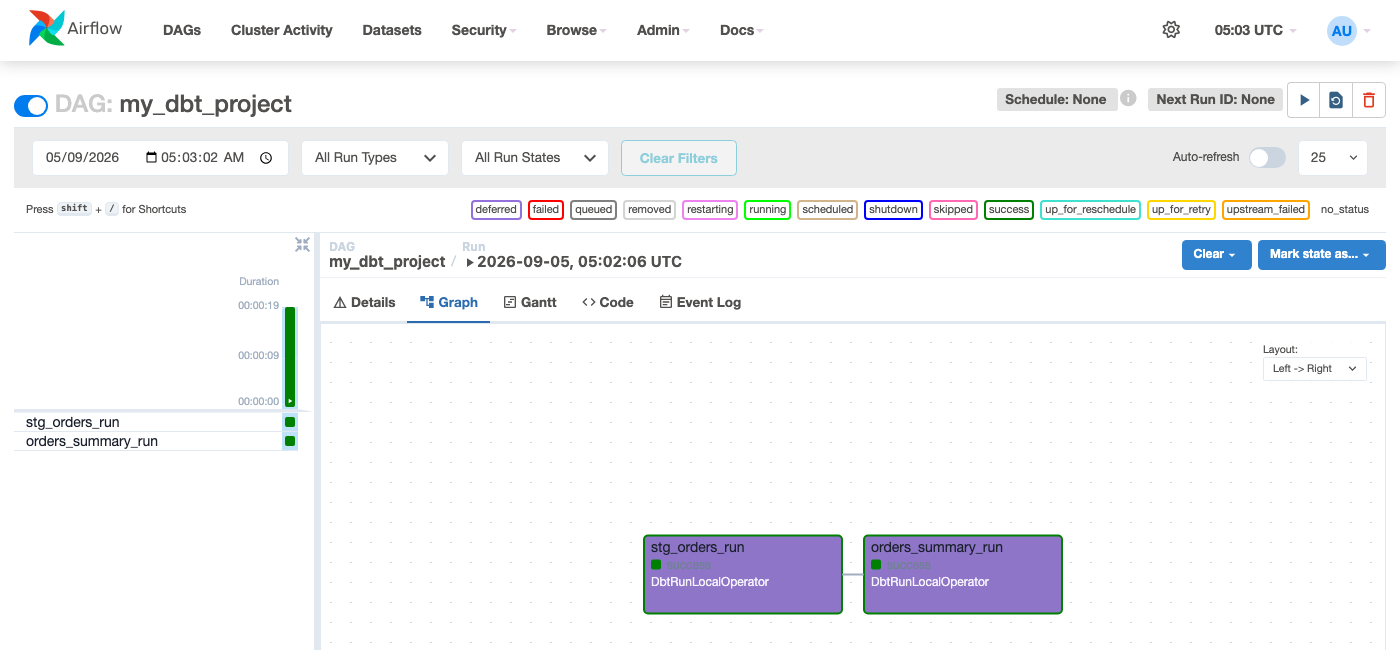 Figure — each box is a real dbt model, not a single monolithic "run dbt" task.
 orders_summary depends on stg_orders because that's what the dbt project's own ref() calls declare — Cosmos read that dependency directly from the project, nothing hand-wired.
The screenshot above ran an actual
dbt run under the hood via Cosmos, against an actual (if minimal) DuckDB database, using an actual two-model dbt project with a real ref() dependency between them - the same mechanism as a production warehouse, just pointed at a lightweight embedded database for this demo.
Task Groups Instead of a Whole DAG
If dbt models are only one part of a bigger pipeline (extract → load → dbt transform → notify), use DbtTaskGroup instead of DbtDag to embed the model tasks inside a larger DAG:
from airflow.decorators import dag, task
from cosmos import DbtTaskGroup

@dag(schedule="@daily", start_date=datetime(2024, 1, 1), catchup=False)
def full_elt_pipeline():

    @task()
    def extract_and_load():
        ...

    transform = DbtTaskGroup(
        group_id="dbt_transform",
        project_config=project_config,
        profile_config=profile_config,
        execution_config=execution_config,
    )

    @task()
    def notify():
        ...

    extract_and_load() >> transform >> notify()
This is exactly the TaskGroup mechanism covered earlier in this course — Cosmos is generating a TaskGroup full of dbt-model tasks, not a new concept.
dbt Cloud Instead of dbt Core
If the team runs dbt Cloud rather than self-hosting dbt Core, Airflow talks to it via API instead of running dbt as a local process:
from airflow.providers.dbt.cloud.operators.dbt import DbtCloudRunJobOperator

trigger_dbt_cloud_job = DbtCloudRunJobOperator(
    task_id="trigger_dbt_cloud_job",
    dbt_cloud_conn_id="dbt_cloud_default",
    job_id=12345,
    wait_for_termination=True,
)
This is the simpler, coarser-grained integration (one task per dbt Cloud job, not per model) — the right choice when dbt Cloud is already managing the project and per-model Airflow visibility isn't required.