
RBAC & Security
Not Everyone Who Uses Airflow Should Be Able to Do Everything
A data analyst who needs to check whether last night's pipeline succeeded has no business being able to edit Connections holding production database passwords. Airflow's RBAC (Role-Based Access Control) system exists for exactly this: fine-grained permissions, not an all-or-nothing admin switch.
The Built-In Roles
Airflow ships with five default roles out of the box:
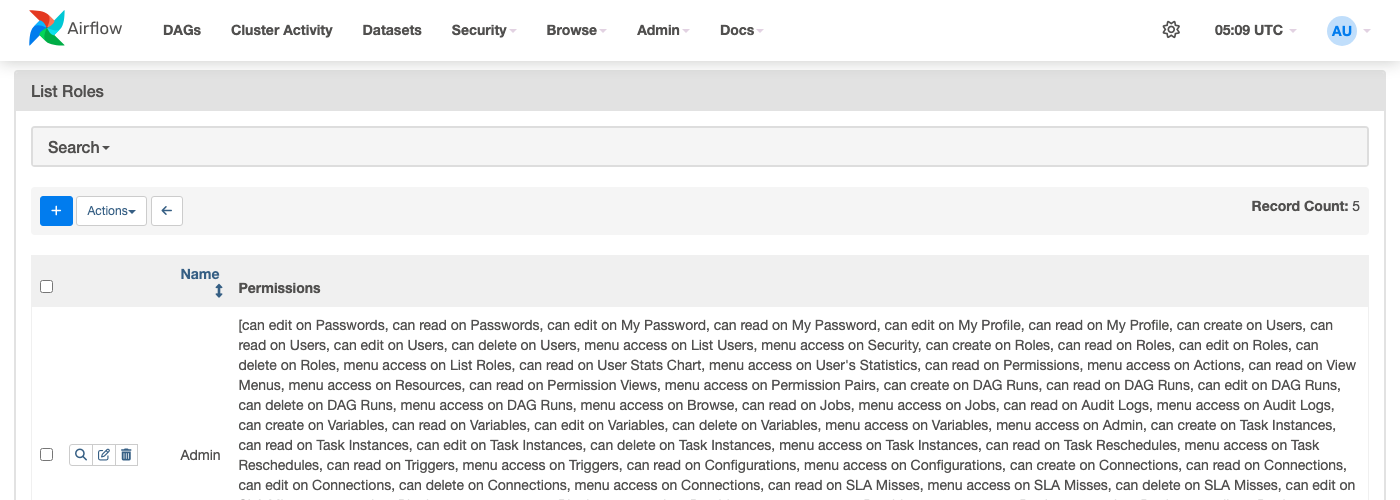 Figure — a real, unmodified Airflow instance's role list. Each permission is a
 can <action> on <resource> pair — "can edit on Connections," "can read on DAG Runs" — combined into named roles.
| Role | Typical Fit |
|---|---|
| Admin | Full access — Connections, Variables, user management, everything |
| Op | Can manage and trigger DAGs, view logs, but not manage users/roles |
| User | Can view and trigger DAGs, no access to Connections/Variables |
| Viewer | Read-only — see DAG status and logs, nothing else |
| Public | Whatever an entirely unauthenticated visitor can see, if anonymous access is enabled at all |
Creating a Custom Role
The built-in five don't have to be the only options — a custom role scoped to exactly one team's needs:
# Not DAG code - this is a one-time setup action, typically via the UI
# (Security -> List Roles -> +) or the CLI:
airflow roles create "Data Quality Team"
airflow roles add-perms "Data Quality Team" \
  --resource "DAG Runs" --action "can read" \
  --resource "Task Instances" --action "can read"
This role can see run history and task logs but can't trigger runs, edit Connections, or touch anything else — read-only visibility for a team that needs to monitor pipelines without being able to change them.
Per-DAG Access (Not Just Per-Role)
Beyond global roles, Airflow supports scoping access to specific DAGs via DAG-level permissions — a role can be restricted to only the DAGs tagged for its team, rather than seeing every DAG in the deployment:
@dag(
    schedule="@daily",
    start_date=...,
    access_control={
        "Data Quality Team": {"can_read", "can_edit"},
    },
)
def sensitive_finance_pipeline():
    ...
A user without "can read on Connections" still can't see a Connection's stored password through the UI - but if their role can trigger DAGs that use that Connection, they can still indirectly cause it to be used. RBAC controls the Airflow UI/API surface; it does not substitute for the actual secrets-handling practices covered in the Secrets Backends page.