Event-Driven Ingestion Pipeline: Azure Blob Storage, Event Hubs, Azure Data Factory & Databricks
1. Executive Overview & Architectural Challenge
In enterprise data engineering, analytical payloads frequently arrive in cloud object storage as multi-file batch datasets—such as partitioned Parquet files generated by upstream transactional databases or SaaS extractors.
A critical failure pattern in event-driven ingestion occurs when cloud storage event notifications trigger downstream processing prematurely:
- The Race Condition: If an upstream process writes 50 Parquet files (
part-0000.parquetthroughpart-0049.parquet) sequentially over several minutes, triggering an execution pipeline on the arrival of individual.parquetfiles causes partial batch reads, duplicate executions, and incomplete aggregations. - The Atomic Manifest Pattern: To eliminate race conditions, enterprise architectures enforce an atomic completion semaphore. Upstream systems write all data files (
*.parquet) first, and upon successful completion, write a lightweight semaphore file namedmetadata.json(or_SUCCESS.json). Only the creation of this metadata manifest triggers the orchestration layer.
2. Simplified Architecture Diagrams
To clearly visualize the end-to-end data lifecycle without complexity, the architecture is broken down into two distinct stages below: Stage 1: Event Detection & Buffering and Stage 2: Orchestration & Lakehouse Ingestion.
Diagram 1: Upstream Ingestion & Event Buffering
Upstream systems write Parquet files followed by the atomic metadata.json trigger file. Azure Event Grid filters for this specific filename and routes the event to Azure Event Hubs.
graph LR
    Source["Upstream Source System"] --> Store["Azure ADLS Gen2 Landing Container"]
    Store -->|Writes metadata.json| EGrid["Azure Event Grid System Topic"]
    EGrid -->|Subject EndsWith /metadata.json| EHub["Azure Event Hubs Namespace"]
Diagram 2: Orchestration & Lakehouse Execution
Azure Data Factory consumes the buffered storage event and triggers an Azure Databricks compute cluster to process and validate the batch.
graph LR
    EHub["Azure Event Hubs"] --> ADFTrigger["ADF Storage Event Trigger"]
    ADFTrigger --> ADFPipeline["ADF Pipeline pl_ingest_batch"]
    ADFPipeline -->|Passes Folder Path & Manifest ID| DBXJob["Databricks Notebook Activity"]
    DBXJob -->|Idempotent MERGE INTO| BronzeTable["Unity Catalog Bronze Delta Table"]
3. End-to-End Handshake Sequence
The sequence diagram below illustrates the chronological interaction between storage events, Data Factory orchestration, and Databricks execution.
sequenceDiagram
    autonumber
    actor Source as Upstream ETL Job
    participant ADLS as Azure ADLS Gen2
    participant EG as Azure Event Grid
    participant ADF as Azure Data Factory
    participant DBX as Azure Databricks

    Source->>ADLS: Upload part-0000.parquet to part-0049.parquet
    Source->>ADLS: Upload marker metadata.json
    ADLS->>EG: Emit BlobCreated Event
    EG->>EG: Filter subject ending with /metadata.json
    EG->>ADF: Dispatch Event Payload
    ADF->>DBX: Trigger Notebook Activity passing folderPath & fileName
    DBX->>ADLS: Read & Validate metadata.json checksums
    DBX->>ADLS: Read all *.parquet files in folderPath
    DBX->>DBX: Execute Quality & Count Validations
    DBX->>ADLS: Write atomically to Bronze Delta Table
    DBX-->>ADF: Return Execution Summary JSON
4. Azure Data Factory Studio Configuration & Visual UI Specification
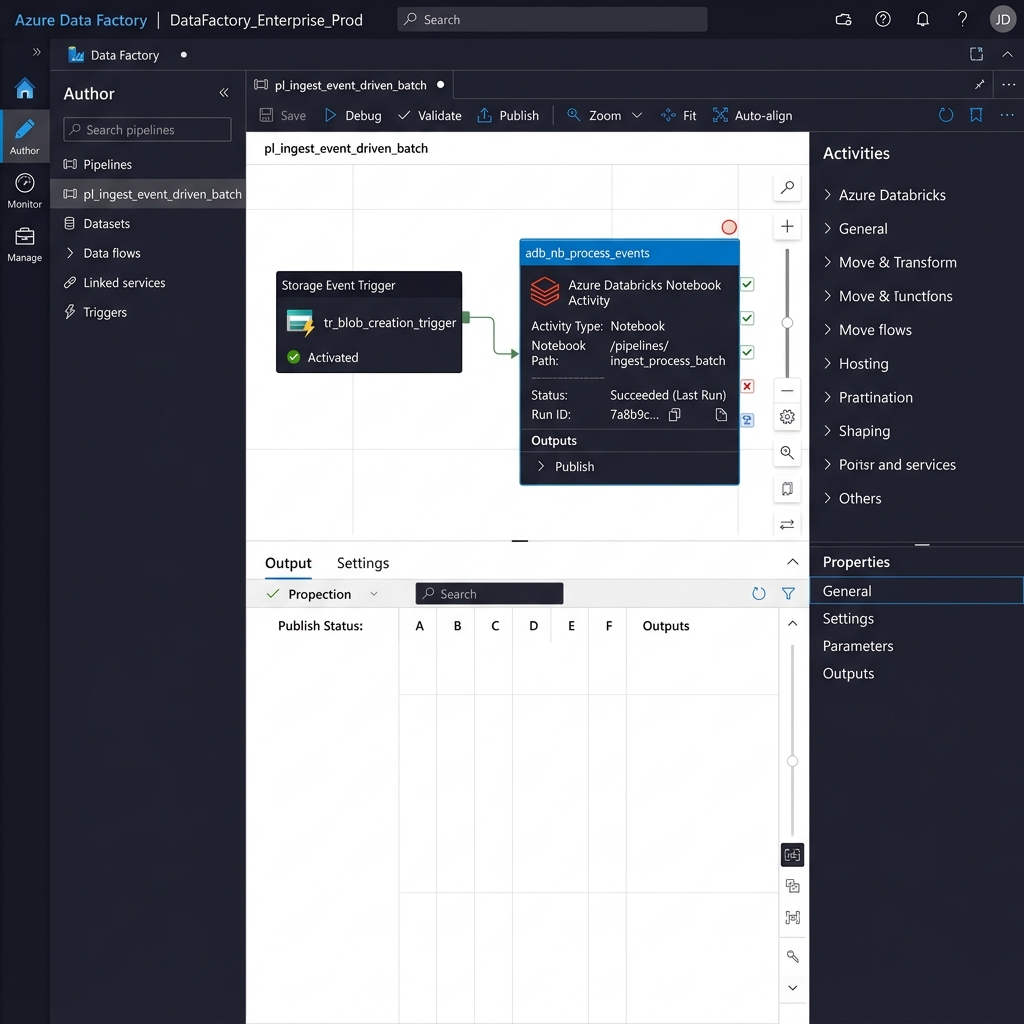
Below is the visual interface representation of the Azure Data Factory Studio Pipeline Authoring Canvas, showing the connection between the Storage Event Trigger (tr_blob_creation_trigger) and the Azure Databricks Notebook Activity (adb_nb_process_events).
4.1 Azure Portal & Event Grid Configuration Matrix
4.2 ADF Storage Event Trigger Specification
In Azure Data Factory Studio, configure a Storage Event Trigger that binds directly to the ADLS Gen2 landing container:
{
  "name": "tr_blob_metadata_arrival",
  "properties": {
    "runtimeState": "Started",
    "pipelines": [
      {
        "pipelineReference": {
          "referenceName": "pl_ingest_event_driven_batch",
          "type": "PipelineReference"
        },
        "parameters": {
          "folderPath": "@triggerBody().folderPath",
          "fileName": "@triggerBody().fileName"
        }
      }
    ],
    "type": "BlobEventsTrigger",
    "typeProperties": {
      "blobPathBeginsWith": "/landing/sales/",
      "blobPathEndsWith": "/metadata.json",
      "ignoreEmptyBlobs": true,
      "events": ["Microsoft.Storage.BlobCreated"]
    }
  }
}
4.3 ADF Databricks Notebook Activity Parameter Mapping
Inside the ADF Pipeline (pl_ingest_event_driven_batch), pass the dynamic values extracted from the storage event into Databricks widgets:
5. Structure of the Upstream metadata.json Trigger File
Before examining the PySpark notebook, review the standardized JSON manifest produced by upstream systems upon completing their multi-file Parquet write:
{
  "batch_id": "batch_8841",
  "source_system": "ERP_SAP_FINANCE",
  "extraction_timestamp_utc": "2026-07-09T07:29:45Z",
  "data_format": "PARQUET",
  "expected_file_count": 4,
  "expected_total_records": 125400,
  "data_files": [
    {
      "file_name": "part-0000.parquet",
      "record_count": 31350,
      "checksum_sha256": "e3b0c44298fc1c149afbf4c8996fb92427ae41e4649b934ca495991b7852b855"
    },
    {
      "file_name": "part-0001.parquet",
      "record_count": 31350,
      "checksum_sha256": "f4c8996fb92427ae41e4649b934ca495991b7852b855e3b0c44298fc1c149afb"
    }
  ]
}
6. Step-by-Step PySpark Databricks Notebook Implementation
Below is the modular production PySpark notebook (ingest_blob_event_batch.py) designed for Azure Databricks Runtime 14.3 LTS.
Part 1: Widget Initialization & Parameter Extraction
In this step, the notebook registers runtime widgets to receive parameters from Azure Data Factory and resolves the fully qualified ABFSS URI.
import json
from pyspark.sql import functions as F
from pyspark.sql import types as T
from pyspark.sql.utils import AnalysisException

# 1. Define Databricks widgets
dbutils.widgets.text("base_folder_path", "/landing/sales/2026/07/09/batch_8841/", "Storage Folder Path")
dbutils.widgets.text("manifest_filename", "metadata.json", "Manifest Filename")
dbutils.widgets.text("pipeline_run_id", "MANUAL_TEST_RUN", "ADF Pipeline Run ID")

# 2. Retrieve runtime parameters
base_folder_path = dbutils.widgets.get("base_folder_path").strip()
manifest_filename = dbutils.widgets.get("manifest_filename").strip()
pipeline_run_id = dbutils.widgets.get("pipeline_run_id").strip()

# 3. Construct fully qualified Azure ADLS Gen2 Storage URI
storage_account = "stdataprodadls01"
container_name = "data-landing"
abfss_base_uri = f"abfss://{container_name}@{storage_account}.dfs.core.windows.net{base_folder_path}"
manifest_full_uri = f"{abfss_base_uri}/{manifest_filename}".replace("//metadata.json", "/metadata.json")

print(f"Pipeline Run ID: {pipeline_run_id}")
print(f"Target Storage Folder: {abfss_base_uri}")
Part 2: Parsing & Validating the metadata.json Manifest
Reads the manifest file directly from ADLS Gen2 and verifies that all declared files and record expectations are present.
def load_and_validate_manifest(manifest_path: str) -> dict:
    """Reads the metadata.json trigger file and validates batch metadata."""
    try:
        raw_content = dbutils.fs.head(manifest_path, 1024 * 1024)
        metadata = json.loads(raw_content)
    except Exception as exc:
        raise RuntimeError(f"FATAL: Unable to read manifest file at {manifest_path}: {exc}") from exc

    expected_count = metadata.get("expected_file_count", 0)
    data_files = metadata.get("data_files", [])

    if len(data_files) != expected_count:
        raise ValueError(
            f"Manifest integrity mismatch! Expected {expected_count} files, "
            f"but found {len(data_files)} declared in manifest array."
        )
    return metadata

batch_metadata = load_and_validate_manifest(manifest_full_uri)
expected_file_count = batch_metadata["expected_file_count"]
expected_total_records = batch_metadata["expected_total_records"]
batch_id = batch_metadata["batch_id"]
Part 3: Explicit Schema Enforcement & Parquet Ingestion
Enforces an explicit StructType schema and validates the loaded record count against the manifest declaration.
# 1. Enforce strict schema contract
sales_schema = T.StructType([
    T.StructField("transaction_id", T.StringType(), False),
    T.StructField("customer_id", T.StringType(), False),
    T.StructField("store_id", T.IntegerType(), True),
    T.StructField("transaction_date", T.DateType(), False),
    T.StructField("net_amount", T.DecimalType(18, 4), False)
])

# 2. Read only .parquet files inside the trigger folder
parquet_glob_path = f"{abfss_base_uri}/*.parquet"

df_raw = spark.read \
    .format("parquet") \
    .schema(sales_schema) \
    .option("mergeSchema", "false") \
    .load(parquet_glob_path)

# 3. Validate actual record count against manifest
actual_record_count = df_raw.count()

if actual_record_count != expected_total_records:
    raise AssertionError(
        f"DATA ATTRITION ERROR: Manifest declared {expected_total_records} records, "
        f"but PySpark read {actual_record_count} records from storage."
    )

print(f"Verification passed successfully. Loaded {actual_record_count} records.")
Part 4: Idempotent Unity Catalog Write via MERGE INTO
Attaches audit metadata columns and executes an idempotent upsert into the Bronze table to prevent duplicate records if ADF retries the event.
# 1. Attach operational audit columns
df_enriched = df_raw \
    .withColumn("_ingestion_batch_id", F.lit(batch_id)) \
    .withColumn("_adf_pipeline_run_id", F.lit(pipeline_run_id)) \
    .withColumn("_ingested_at_utc", F.current_timestamp())

# 2. Target Unity Catalog Table
target_table_name = "cat_enterprise.bronze.sales_event_raw"

# 3. Perform idempotent MERGE INTO
df_enriched.createOrReplaceTempView("vw_incoming_batch")

merge_sql = f"""
    MERGE INTO {target_table_name} AS target
    USING vw_incoming_batch AS source
    ON target.transaction_id = source.transaction_id
       AND target._ingestion_batch_id = source._ingestion_batch_id
    WHEN MATCHED THEN
      UPDATE SET *
    WHEN NOT MATCHED THEN
      INSERT *
"""

spark.sql(merge_sql)
print("Idempotent Delta Lake MERGE completed successfully.")
Part 5: Storage Archival & ADF Summary Return
Archives the processed folder to clean up the landing zone and returns a structured JSON result to the calling ADF pipeline.
# 1. Archive processed batch directory
archive_base_uri = f"abfss://data-archive@{storage_account}.dfs.core.windows.net/sales/{batch_id}"

try:
    dbutils.fs.mv(abfss_base_uri, archive_base_uri, recurse=True)
    print("Archival completed successfully.")
except Exception as archive_err:
    print(f"WARNING: Archival failed: {archive_err}")

# 2. Return JSON execution payload to ADF Pipeline
response_payload = {
    "status": "SUCCESS",
    "batch_id": batch_id,
    "records_ingested": actual_record_count,
    "target_table": target_table_name
}

dbutils.notebook.exit(json.dumps(response_payload))