Enterprise Incremental Ingestion with Databricks Auto Loader (cloudFiles) & Azure ADLS Gen2
1. Executive Overview & Architectural Foundation
As cloud data lakes scale to millions of historical files, traditional batch extraction (spark.read.load()) suffers from quadratic degradation: every execution must scan directory metadata across the entire storage hierarchy to discover newly arrived files.
To achieve performant, cost-optimized incremental loading on Azure Databricks, enterprise architectures leverage Databricks Auto Loader (cloudFiles). Auto Loader provides stateful, exactly-once incremental file discovery via two operation modes:
- Directory Listing Mode (Default): Leverages optimized parallel directory listings against storage checkpoints to identify newly created files. Best suited for predictable, low-to-medium file arrival volumes.
- File Notification Mode (
useNotifications=true): Automatically provisions an Azure Event Grid subscription and Azure Storage Queue. As files arrive in Azure ADLS Gen2, notifications are queued instantly. Auto Loader reads the queue rather than scanning directories, making discovery O(1) regardless of historical lake size.
2. Simplified Architecture Diagrams
To keep each flow easy to read and digest, the architecture is split into two simple diagrams below.
Diagram 1: O(1) File Notification Discovery
When cloudFiles.useNotifications is enabled, Azure Event Grid automatically captures new file arrivals and queues lightweight notification messages in an Azure Storage Queue. Auto Loader consumes these queue messages instead of listing storage directories.
graph LR
    Landing["Azure ADLS Gen2 Storage Container"] --> EventGrid["Azure Event Grid System Topic"]
    EventGrid --> Queue["Azure Storage Queue"]
    Queue --> AutoLoader["Databricks Auto Loader Reader"]
    AutoLoader --> Checkpoint["RocksDB State Checkpoint"]
Diagram 2: Incremental Medallion Lakehouse Pipeline
New files discovered by Auto Loader flow incrementally into the Bronze table with Schema Evolution enabled, and are refined into the Silver table via micro-batch deduplication.
graph LR
    SourceStream["Auto Loader cloudFiles Stream"] --> BronzeTable["Unity Catalog Bronze Delta Table"]
    BronzeTable --> SilverStream["foreachBatch CDC Micro-Batch"]
    SilverStream --> SilverTable["Unity Catalog Curated Silver Table"]
3. Step-by-Step Azure Cloud Infrastructure & Permissions Setup
When using Databricks Auto Loader in Notification Mode on Azure ADLS Gen2, the Databricks Service Principal or Unity Catalog Storage Credential must possess sufficient Azure Role-Based Access Control (RBAC) permissions.
3.1 Azure IAM RBAC Roles Matrix
Assign the following roles to your Databricks Managed Identity within the target Azure Resource Group:
3.2 Unity Catalog External Location Configuration
In Unity Catalog, bind your Azure Managed Identity to an External Location pointing to the landing directory:
-- 1. Create Unity Catalog Storage Credential
CREATE STORAGE CREDENTIAL cred_azure_adls_landing
  TYPE AZURE_MANAGED_IDENTITY
  WITH (MANAGED_IDENTITY_ID = 'xxxx-xxxx-xxxx-xxxx');

-- 2. Create External Location pointing to ADLS Gen2 landing folder
CREATE EXTERNAL LOCATION loc_adls_landing
  URL 'abfss://data-landing@stdataprodadls01.dfs.core.windows.net/transactions/'
  WITH (STORAGE CREDENTIAL cred_azure_adls_landing);

-- 3. Grant usage permissions to the data engineering group
GRANT READ_FILES ON EXTERNAL LOCATION loc_adls_landing TO `grp_data_engineers`;
4. Azure Databricks Workspace Interface & PySpark Notebook Implementation
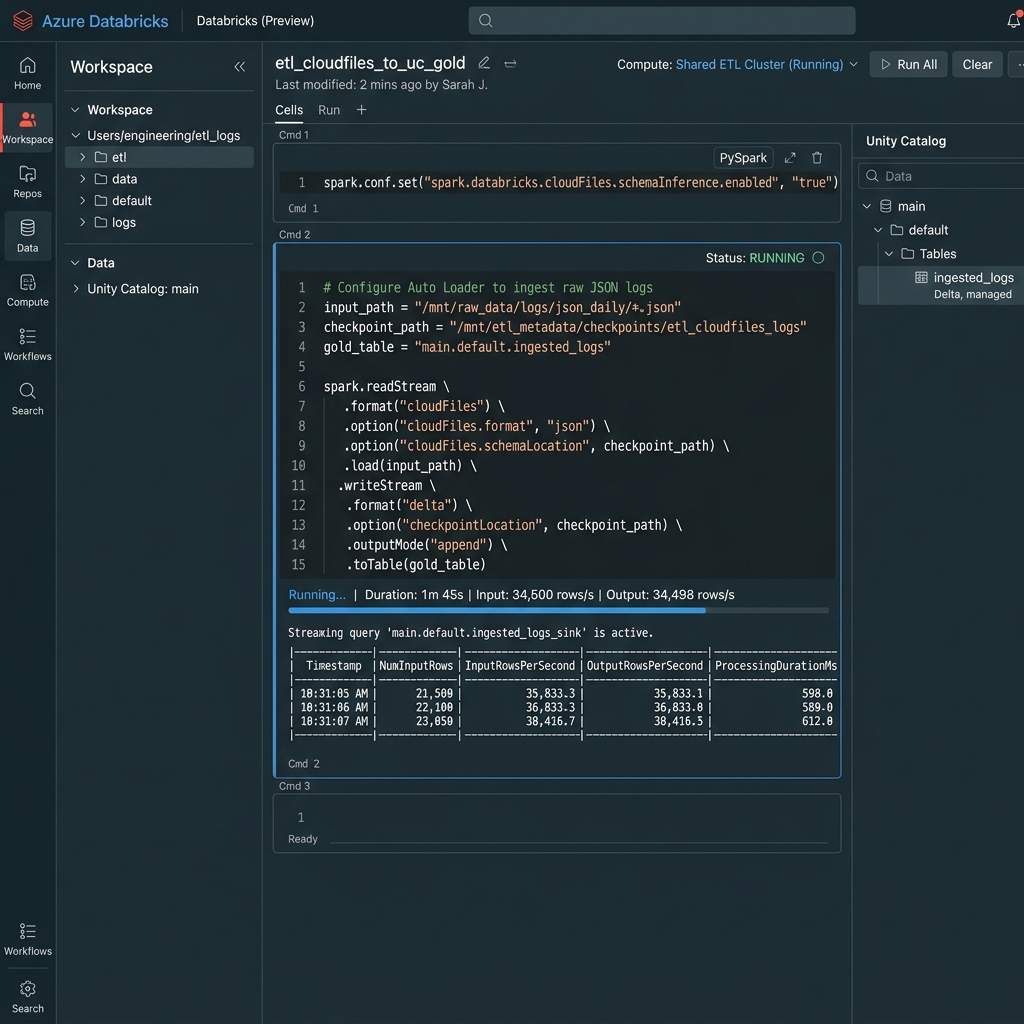
Below is the visual interface representation of the Azure Databricks Workspace Notebook, showing PySpark cells executing structured streaming Auto Loader (spark.readStream.format("cloudFiles")) and displaying live execution throughput metrics.
Part 1: Lakehouse Path & Configuration Initialization
Configures source folder paths, state checkpoint directories, and target Unity Catalog Delta table names.
from pyspark.sql import functions as F
from pyspark.sql import types as T

# 1. Base ADLS Gen2 storage paths
storage_account = "stdataprodadls01"
landing_container = "data-landing"
checkpoint_container = "data-checkpoints"

source_uri = f"abfss://{landing_container}@{storage_account}.dfs.core.windows.net/transactions/incoming/"
bronze_checkpoint = f"abfss://{checkpoint_container}@{storage_account}.dfs.core.windows.net/checkpoints/bronze_transactions/"
bronze_schema_location = f"abfss://{checkpoint_container}@{storage_account}.dfs.core.windows.net/schemas/bronze_transactions/"
silver_checkpoint = f"abfss://{checkpoint_container}@{storage_account}.dfs.core.windows.net/checkpoints/silver_transactions/"

# 2. Target Unity Catalog Tables
bronze_table = "cat_enterprise.bronze.transactions_raw"
silver_table = "cat_enterprise.silver.transactions_curated"

print(f"Incremental Source Folder:    {source_uri}")
print(f"Bronze Checkpoint State Path: {bronze_checkpoint}")
Part 2: Bronze Layer — Incremental Auto Loader Ingestion (cloudFiles)
Configures spark.readStream.format("cloudFiles") with Schema Evolution (addNewColumns) and Rescue Data Handling (_rescued_data). Uses scheduled micro-batches (availableNow=True) for enterprise cost optimization.
# 1. Configure Auto Loader Stream Reader
df_autoloader = spark.readStream \
    .format("cloudFiles") \
    .option("cloudFiles.format", "parquet") \
    .option("cloudFiles.schemaLocation", bronze_schema_location) \
    .option("cloudFiles.schemaEvolutionMode", "addNewColumns") \
    .option("cloudFiles.rescuedDataColumn", "_rescued_data") \
    .option("cloudFiles.useNotifications", "true") \
    .load(source_uri)

# 2. Enrich with audit metadata
df_bronze_enriched = df_autoloader \
    .withColumn("_ingested_at_utc", F.current_timestamp()) \
    .withColumn("_source_file_path", F.input_file_name())

# 3. Execute Incremental Micro-Batch Write to Unity Catalog Bronze Table
bronze_stream_query = df_bronze_enriched.writeStream \
    .format("delta") \
    .outputMode("append") \
    .option("checkpointLocation", bronze_checkpoint) \
    .option("mergeSchema", "true") \
    .trigger(availableNow=True) \
    .toTable(bronze_table)

print("Started Bronze incremental Auto Loader execution...")
bronze_stream_query.awaitTermination()
print("Bronze incremental batch processed successfully.")
Part 3: Silver Layer — Incremental CDC MERGE (Upsert) via foreachBatch
Refines raw Bronze events into a deduplicated Silver table by consuming the Bronze Delta stream and applying an idempotent MERGE INTO operation inside foreachBatch.
def upsert_silver_micro_batch(micro_batch_df, batch_id: int):
    """
    Executes an idempotent MERGE INTO the Silver table for each incremental micro-batch.
    Handles intra-batch deduplication by picking the latest timestamp per transaction_id.
    """
    if micro_batch_df.isEmpty():
        return

    # 1. Deduplicate records within the incoming micro-batch
    from pyspark.sql.window import Window
    window_spec = Window.partitionBy("transaction_id").orderBy(F.col("_ingested_at_utc").desc())

    deduped_batch_df = micro_batch_df \
        .withColumn("_rn", F.row_number().over(window_spec)) \
        .filter(F.col("_rn") == 1) \
        .drop("_rn")

    # 2. Create local view for Spark SQL MERGE
    deduped_batch_df.createOrReplaceTempView("vw_silver_upsert_source")

    # 3. Execute atomic Delta Lake MERGE
    merge_sql = f"""
        MERGE INTO {silver_table} AS target
        USING vw_silver_upsert_source AS source
        ON target.transaction_id = source.transaction_id
        WHEN MATCHED AND target._ingested_at_utc < source._ingested_at_utc THEN
          UPDATE SET *
        WHEN NOT MATCHED THEN
          INSERT *
    """
    micro_batch_df._sc._jvm.org.apache.spark.sql.SparkSession.active().sql(merge_sql)

# 4. Read incrementally from Bronze Delta Table
df_bronze_stream = spark.readStream \
    .format("delta") \
    .table(bronze_table)

# 5. Execute Silver CDC Stream
silver_stream_query = df_bronze_stream.writeStream \
    .foreachBatch(upsert_silver_micro_batch) \
    .option("checkpointLocation", silver_checkpoint) \
    .trigger(availableNow=True) \
    .start()

print("Started Silver incremental MERGE execution...")
silver_stream_query.awaitTermination()
print("Silver incremental curation completed successfully.")
Part 4: Operational Stream Progress Inspection
Helper snippet to inspect live query progress metrics, offsets, and throughput directly from streaming telemetry.
def print_stream_progress_metrics(stream_query):
    """Extracts and formats operational telemetry from a Spark Streaming query."""
    progress = stream_query.lastProgress
    if not progress:
        print("No progress metrics available yet.")
        return

    print("=======================================================================")
    print(f"Query Name / ID:      {progress.get('name', 'N/A')} ({progress.get('id')})")
    print(f"Batch ID:             {progress.get('batchId')}")
    print(f"Input Rows Processed: {progress.get('numInputRows')}")
    print(f"Input Rows / Sec:     {progress.get('inputRowsPerSecond'):.2f}")
    print(f"Processed Rows / Sec: {progress.get('processedRowsPerSecond'):.2f}")
    print("=======================================================================")